
Turn your GitHub contribution graph into a canvas.
Write words, draw patterns, and make your profile stand out — automatically.



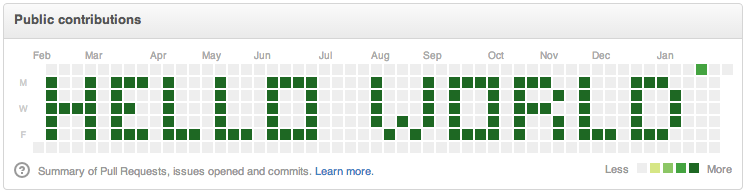
Example: "HELLO WORLD" written on a real GitHub contribution graph
- What Is This?
- How the GitHub Graph Works
- Features
- Prerequisites
- Installation
- Quick Start
- CLI Usage
- All Modes & Usage
- Intensity Levels
- Supported Characters & Symbols
- Tips & Tricks
- FAQ
- Contributing
- Made With
- License
Your GitHub profile shows a contribution graph — a 52-week × 7-day grid where each cell lights up green based on how many commits you made that day.
This tool crafts commits with backdated timestamps to paint that grid like a pixel display. You can:
- Scatter random commits to make your graph look busy and active
- Spell out words like
HELLO,COOL, your name, or any message - Draw geometric patterns (checkerboard, wave, stripes)
- Design your own custom pixel art
Note: This is for fun / learning / portfolio aesthetics. The commits are real Git commits — they just have custom dates.
GitHub's contribution graph is a 52-column × 7-row grid:
        Week 0  Week 1  Week 2  ...  Week 51
Sun  [  ░  ] [  ░  ] [  ░  ]       [  ░  ]
Mon  [  ░  ] [  ░  ] [  ░  ]       [  ░  ]
Tue  [  ░  ] [  ░  ] [  ░  ]       [  ░  ]
Wed  [  ░  ] [  ░  ] [  ░  ]       [  ░  ]
Thu  [  ░  ] [  ░  ] [  ░  ]       [  ░  ]
Fri  [  ░  ] [  ░  ] [  ░  ]       [  ░  ]
Sat  [  ░  ] [  ░  ] [  ░  ]       [  ░  ]
Each cell's shade is determined by commit count that day:
| Commits | Color |
|---|---|
| 0 | ⬜ Empty |
| 1–3 | 🟩 Light green |
| 4–9 | 🟩 Medium green |
| 10–19 | 🟩 Dark green |
| 20+ | 🟩 Darkest green |
This tool writes commits with --date overrides to place them precisely in any cell.
| Feature | Description |
|---|---|
| 🎲 Random fill | Scatter N commits randomly across the past year |
| ✏️ Text art | Write words/phrases using a 5×7 pixel font |
| 🔷 Built-in patterns | Checkerboard, wave, diagonal stripes |
| 🖌️ Custom grid | Supply your own 7×52 intensity array |
| 🔍 Dry run mode | Preview your art in the terminal without touching Git |
| 🌈 Intensity control | Light / medium / heavy green per cell |
| 💬 Terminal preview | See a █ / ░ ASCII preview before committing |
| 📦 Push automation | Automatically pushes to your remote after drawing |
Before you begin, make sure you have:
- Node.js v18 or later (Download)
- npm v8 or later (comes with Node)
- Git installed and configured on your machine
- A GitHub account with a repository to push to
- Your SSH key or HTTPS token set up so
git pushworks without prompts
# Clone the repo
git clone https://github.com/kushdeveloper68/github-graph-art.git
cd github-graph-art
⚠️ Use a fresh, empty repository — not an existing project.
The script will spam commits and overwritedata.jsonconstantly.
- Go to github.com/new
- Name it something like
github-graph-artorcommit-art - Make it public (private repos don't show on the contribution graph unless you enable it in settings)
- Don't initialize with a README
- Copy the remote URL
git remote set-url origin https://github.com/YOUR_USERNAME/YOUR_REPO.git
# or for SSH:
git remote set-url origin git@github.com:YOUR_USERNAME/YOUR_REPO.gitnpm installecho '{"date":"init"}' > data.json
git add data.json
git commit -m "init"
git push -u origin mainOpen index.js and uncomment one mode at the bottom of the file:
// ─── CLI Entry Point ──────────────────────────────────────────────────────────

// 1️⃣  100 random commits scattered across the year
makeRandomCommits(100);

// 2️⃣  Write "HELLO" starting at week 5
// makeTextArt("HELLO", 5, "heavy", false);
Then run:
node index.jsOr use the CLI flags directly:
node index.js random --count 100 --intensity random
node index.js text --text "HELLO" --week 5 --level heavy --dry-run
node index.js pattern --pattern wave
node index.js custom --grid-file ./grid.json
npm start still runs the default random mode, and any flags can be passed after --:
npm start -- random --count 100 --dry-runThe script now accepts terminal flags instead of requiring edits to the bottom of index.js.
random- random commits across the past yeartext- draw a word or phrasepattern- draw a built-in patterncustom- draw a 7x52 grid from a JSON file
| Flag | Description |
|---|---|
--count, -n |
Total commits for random mode |
--intensity |
Random mode intensity: random, light, medium, heavy, or a number |
--text |
Text to render in text mode |
--week |
Start week for text mode |
--level |
Text/pattern intensity: light, medium, or heavy |
--pattern |
Pattern name: checkerboard, wave, or stripes |
--grid-file |
Path to a JSON file containing a 7x52 grid |
--dry-run |
Preview without committing |
--help, -h |
Show the built-in usage help |
node index.js random --count 200 --intensity heavy
node index.js random --count 50 --intensity random --dry-run
node index.js text --text "CODE" --week 10 --level medium
node index.js pattern --pattern checkerboard --dry-runScatter commits randomly across the past year. Great for making your graph look naturally active.
import { makeRandomCommits } from "./index.js";

// Scatter 200 commits randomly
makeRandomCommits(200);

// Dry run first to see what dates would be used
makeRandomCommits(200, true);

// Mix random intensity levels for each commit, or force a fixed intensity
makeRandomCommits(200, false, "random");
makeRandomCommits(200, false, "heavy");
Parameters:
| Param | Type | Default | Description |
|---|---|---|---|
n |
number | — | Total number of commits to make |
dryRun |
boolean | false |
If true, only prints dates — no commits made |
intensity |
string or number | "random" |
random, light, medium, heavy, or a custom commit count per cell |
Write a custom word or phrase onto your graph using a built-in 5×7 pixel font.
import { makeTextArt } from "./index.js";

// Write "HI" starting at week 10 with heavy intensity
makeTextArt("HI", 10, "heavy");

// Write your name (dry run preview first)
makeTextArt("CODE", 0, "heavy", true);

// Combine two words side by side (each letter = 6 cols wide)
// "COOL" = 4 letters × 6 cols = 24 columns → start "CODE" at week 26
makeTextArt("COOL", 0, "heavy");
makeTextArt("CODE", 26, "heavy");
Parameters:
| Param | Type | Default | Description |
|---|---|---|---|
text |
string | — | The word/phrase to draw |
startWeek |
number | 0 |
Which week column to begin (0–51) |
level |
string | "heavy" |
Intensity: "light", "medium", or "heavy" |
dryRun |
boolean | false |
Preview without committing |
Planning your text position:
- Each character is 5 columns wide + 1 column spacing = 6 columns per letter
- The graph is 52 columns wide = max ~8 letters
- Example: A 5-letter word = 30 columns → fits nicely starting at week 10
Terminal preview output:
✏️  Drawing text: "HI" starting at week 10

█░░░█ ░█░
█░░░█ ░█░
█░░░█ ░█░
█████ ░█░
█░░░█ ░█░
█░░░█ ░█░
█░░░█ ░█░
Draw geometric patterns across the entire 52-week graph.
import { makePattern } from "./index.js";

// Available patterns: "checkerboard", "wave", "stripes"
makePattern("wave");
makePattern("checkerboard");
makePattern("stripes");

// Dry run preview
makePattern("wave", true);
Pattern descriptions:
| Pattern | Description |
|---|---|
checkerboard |
Alternating heavy/empty cells like a chess board |
wave |
Sinusoidal wave sweeping left to right |
stripes |
Diagonal stripes at 45° |
Supply your own 7×52 intensity matrix for full pixel-art control.
import { makeCustomGrid } from "./index.js";

// Each row = one day of the week (0=Sun, 6=Sat)
// Each column = one week
// Values: 0 = empty, 1 = light, 5 = medium, 15 = heavy

const myGrid = [
  [0,0,15,0,0, ...],   // Sunday
  [0,15,15,15,0, ...], // Monday
  [15,0,15,0,15, ...], // Tuesday
  [0,15,15,15,0, ...], // Wednesday
  [0,0,15,0,0, ...],   // Thursday
  [0,0,0,0,0, ...],    // Friday
  [0,0,0,0,0, ...],    // Saturday
];

makeCustomGrid(myGrid, false);Every function accepts a dryRun parameter. When true:
- Prints the ASCII terminal preview
- Prints all dates that would be used
- Makes zero Git commits
Always test with dryRun: true first:
makeTextArt("HELLO", 0, "heavy", true);  // ← safe preview
makeTextArt("HELLO", 0, "heavy", false); // ← actually commitsControl how dark each cell appears on the graph:
const INTENSITY = {
  none:   0,   // ⬜ empty cell
  light:  1,   // 🟩 barely visible
  medium: 5,   // 🟩 medium green
  heavy:  15,  // 🟩 darkest green
};
Use "light" intensity to create subtle outlines, or mix intensities in a custom grid for gradient effects.
The built-in pixel font currently supports:
| Category | Characters |
|---|---|
| Uppercase letters | A–Z |
| Digits | 0–3 (more coming soon) |
| Symbols | ! ♥ (space) |
Can't see your character? Unknown characters are silently skipped.
You can add your own glyphs to theFONTobject inindex.js— each is a 7×5 boolean grid. PRs for new characters are very welcome!
1. Always dry run first
makeTextArt("HELLO", 0, "heavy", true); // preview2. Plan your layout with column math
- 6 columns per character × number of chars = total width needed
- Graph = 52 columns wide
- Leave a few blank weeks on each edge for visual breathing room
3. Combine modes
// Background random noise + text on top
await makeRandomCommits(50);
await makeTextArt("CODE", 20, "heavy");
4. Wait a few minutes after pushing GitHub caches contribution graphs — your art usually appears within 5–10 minutes.
5. Set your repo to public Private repo commits only show on the graph if you enable "Private contributions" in your GitHub settings at github.com/settings/profile.
6. Use a throwaway repo Point the remote at a dedicated art repo so it doesn't pollute a real project's history.
Q: Will this hurt my GitHub account?
A: No. These are standard Git commits with custom --date metadata. GitHub treats them identically to any other commit.
Q: My graph didn't change after running the script.
A: Check that (1) git push succeeded, (2) the repo is public, and (3) you've waited ~10 minutes for GitHub's cache to refresh.
Q: Can I draw on a specific month/date range?
A: Yes — adjust startWeek. Week 0 is ~one year ago, week 51 is the current week. Count forward from week 0 to reach any month.
Q: Can I erase the graph?
A: GitHub doesn't let you "un-count" commits easily. You'd need to delete the repository and recreate it, or use git rebase to remove the commits. Consider this a one-way operation.
Q: The text is cut off on the right side.
A: Your word is wider than the remaining columns from startWeek. Lower startWeek or use a shorter word.
Q: Can I write lowercase?
A: The script auto-uppercases your input. At 5×7 pixels, lowercase letters are very hard to distinguish — uppercase looks much cleaner on the graph grid.
Contributions are warmly welcomed! Here's how to get involved:
- Fork this repository
- Create a feature branch:
git checkout -b feature/new-pattern - Commit your changes with a clear message
- Push and open a Pull Request
- Add more letters/digits to the
FONTobject - Add more built-in patterns (spiral, cross, border)
- CLI argument parsing (
node index.js text --text HELLO --week 5) - Interactive mode with prompts
- Week-position calculator / planning helper
- Digit completion (currently only 0–3 are defined)
Please keep PRs focused on a single feature/fix. Add a comment explaining what your pattern or glyph does.
| Package | Purpose |
|---|---|
simple-git |
Programmatic Git operations (add, commit, push) |
moment |
Date arithmetic for backdating commits |
jsonfile |
Writing the data scratch file for each commit |
random |
Generating random week/day positions |
| Node.js ESM | Modern ES module syntax (import/export) |
This project is licensed under the MIT License — see the LICENSE file for details.
You're free to use, modify, and distribute this for any purpose.
Made with ❤️ for GitHub profile aesthetics
If you find this useful, please ⭐ star the repo!