


TUI that connects to a list of host:port targets over TLS and ranks them by
days until their certificate expires — like top, but for certificate
expiry.
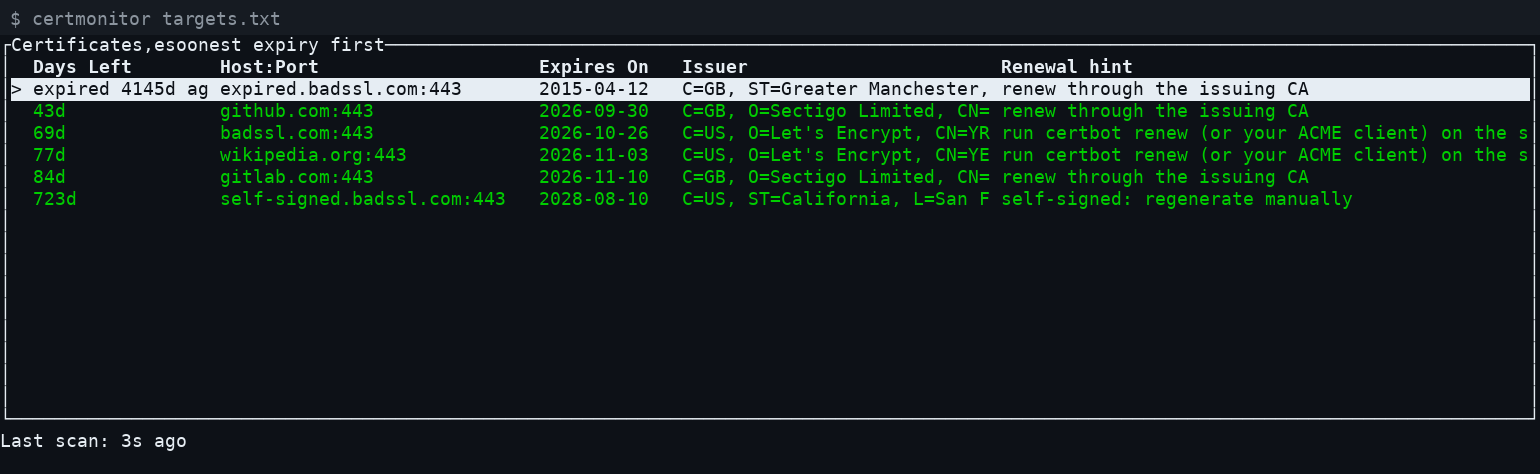
$ certmonitor targets.txt                        # interactive TUI
$ certmonitor --once targets.txt                 # one-shot report for cron/systemd
$ certmonitor --interval 300 targets.txt         # auto-rescan every 5 minutes
$ certmonitor --serve 0.0.0.0:8080 targets.txt   # auto-refreshing web page instead of the TUI
$ certmonitor --no-revocation targets.txt        # skip the CRL revocation check (offline use)
targets.txt is a plain text file, one target per line, as host or
host:port (bare hosts default to 443). Blank lines and lines starting
with # are ignored:
example.com
example.com:8443
internal-app.local:443
# a comment
Since it's a plain TLS client connecting outward, certmonitor can check
any host it can reach over the network — a public website just as easily as
an internal server — no SSH or agent installed on the target required.
Each row is colored by days-left: green (OK), yellow (--warn-days,
default 30), red (--critical-days, default 7, or already expired, or the
check itself failed — e.g. connection refused, DNS failure, TLS handshake
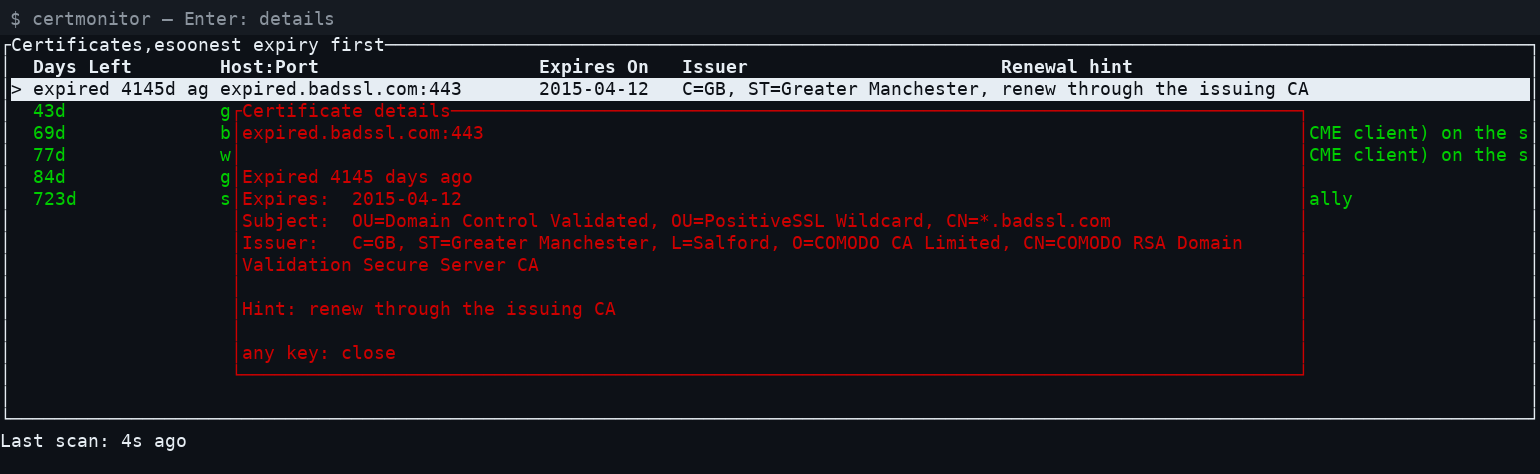
error). Select a row with ↑/↓ and press Enter for a detail popup with
the full subject, issuer, and a short renewal hint guessed from who issued
the cert (e.g. Let's Encrypt certs suggest certbot renew). The hint is a
guess based only on what the TLS handshake reveals, not real knowledge of
how the target server manages its certs — a starting point, not a command
to run blindly.
Keys:
↑/↓: move the selectionEnter: show details for the selected certificater: rescan nowq/Esc: quit
certmonitor also checks if a certificate was revoked. It does this with CRLs (certificate revocation lists). For the leaf and each intermediate certificate on the path, it:
- reads the CRL URL from the certificate (CRL Distribution Points),
- downloads the CRL (DER or PEM) over HTTP(S),
- checks the CRL signature with the key of the issuing CA,
- looks for the certificate's serial number in the CRL.
The issuing CA's key comes from the chain the server sent, the Mozilla root store, or the certificate's "CA Issuers" URL. certmonitor first checks that this key really signed the certificate. A CRL with a wrong or missing signature is not trusted.
The column shows one of these values:
OK(green): every certificate was checked and none is revoked.REVOKED(red): a certificate is on its CA's CRL. The detail view shows which certificate, the revocation date, and the reason if the CRL gives one. Revoked targets are always at the top of the list and count as critical (exit code2with--once).UNKNOWN(yellow): the check could not be done. Examples: the certificate has no CRL URL, the download failed, the CRL could not be parsed, or its signature could not be verified. The detail view and the hint column say why.UNKNOWNdoes not change the row color or the exit code.-: the check is off, or the connection itself failed.
Downloads time out after 10 seconds without a response. Each CRL is
downloaded once and cached until its nextUpdate time, for at most one
hour. Checks run in background threads, so the TUI does not freeze.
Use --no-revocation (or revocation = false in the config file) to turn
the check off, for example when you have no network access to the CA.
Limits:
- CRL only. There is no OCSP support. The industry is phasing OCSP out, and some CAs have already stopped it.
- The result depends on the CA. If a certificate has no CRL URL, the
result is
UNKNOWN. For example, some CAs still put only an OCSP URL in the leaf certificate. - Delta CRLs and indirect CRLs are not supported. They give
UNKNOWN. - For an expired certificate the result is
UNKNOWNunless the CRL still lists it, because CAs remove expired certificates from their CRLs.
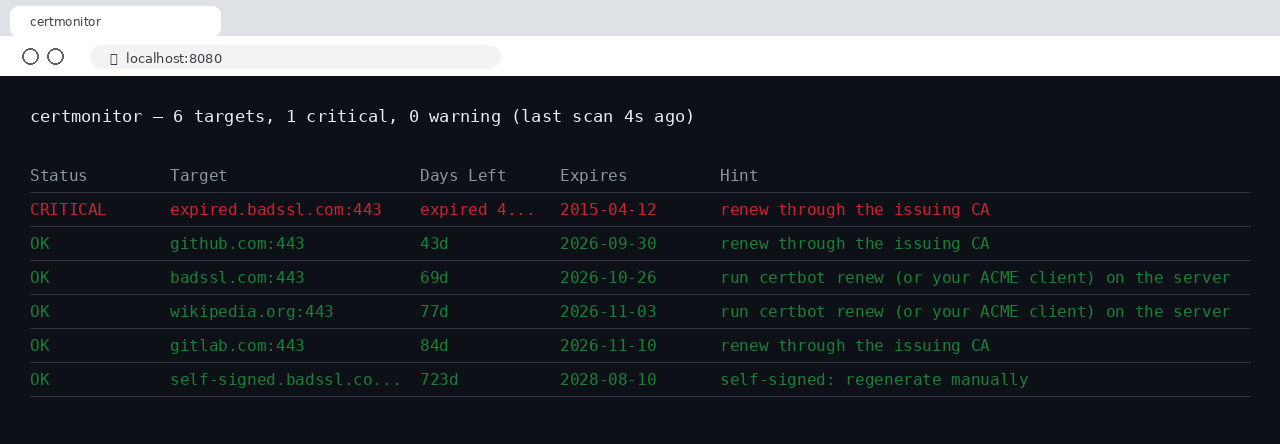
--serve <addr> (e.g. --serve 0.0.0.0:8080) skips the TUI and instead
serves the same ranked table as a plain HTML page at /, auto-refreshing
via <meta http-equiv="refresh"> every --interval seconds (default 300
in this mode). A background thread rescans on that schedule; requests are
always answered instantly from whatever the last scan left behind, never
blocked on a live check.
$ docker build -t certmonitor .
$ docker run -d -p 8080:8080 \
    -v /path/to/targets.txt:/etc/certmonitor/targets.txt:ro \
    certmonitor
The image's default command is --serve 0.0.0.0:8080 /etc/certmonitor/targets.txt, so mounting a targets file at that path and
publishing port 8080 is all that's needed. Override the command to change
the interval or thresholds, e.g.:
$ docker run -d -p 8080:8080 \
    -v /path/to/targets.txt:/etc/certmonitor/targets.txt:ro \
    certmonitor --serve 0.0.0.0:8080 --interval 60 --warn-days 14 \
    /etc/certmonitor/targets.txt
Repeating --warn-days, --critical-days, etc. on every invocation gets
old fast, especially for a scheduled job. Put them in
~/.config/certmonitor/config.toml instead:
warn_days = 30
critical_days = 7
timeout = 5
interval = 300
revocation = true
A --config <path> flag points at a different file. Any flag passed on the
command line overrides the same setting in the config file.
--once runs a single scan, prints a plain aligned report (colored when
run in a real terminal, plain when piped/logged), and exits with a
Nagios-style code: 0 if everything is OK, 1 if anything is in warning
range, 2 if anything is critical, expired, or unreachable. That exit code
is the hook for alerting — wire up the actual notification (email, Slack,
PagerDuty, ...) through whatever your scheduler already uses for failed-job
alerts, rather than certmonitor reinventing it.
# /etc/systemd/system/certmonitor.service
[Unit]
Description=certmonitor daily certificate check
OnFailure=certmonitor-alert.service   # your own notification unit

[Service]
Type=oneshot
ExecStart=/usr/local/bin/certmonitor --once /etc/certmonitor/targets.txt
# /etc/systemd/system/certmonitor.timer
[Unit]
Description=Run certmonitor daily
[Timer]
OnCalendar=daily
Persistent=true
[Install]
WantedBy=timers.target$ sudo systemctl enable --now certmonitor.timer
OnFailure= fires whenever the service exits non-zero (exit code 1 or 2
above) — point it at your own unit that sends the actual notification.
No need to register it as a Windows service — a daily scheduled task
calling --once is the direct equivalent of the systemd timer above:
schtasks /create /tn "certmonitor" /sc daily /st 09:00 ^
  /tr "C:\path\to\certmonitor.exe --once C:\path\to\targets.txt"
Check the exit code from whatever wraps the task (a follow-up action, a monitoring agent, or a small wrapper script) to trigger a real alert.
<!-- ~/Library/LaunchAgents/com.wabuntu.certmonitor.plist -->
<?xml version="1.0" encoding="UTF-8"?>
<!DOCTYPE plist PUBLIC "-//Apple//DTD PLIST 1.0//EN"
  "http://www.apple.com/DTDs/PropertyList-1.0.dtd">
<plist version="1.0">
<dict>
  <key>Label</key><string>com.wabuntu.certmonitor</string>
  <key>ProgramArguments</key>
  <array>
    <string>/usr/local/bin/certmonitor</string>
    <string>--once</string>
    <string>/usr/local/etc/certmonitor/targets.txt</string>
  </array>
  <key>StartCalendarInterval</key>
  <dict>
    <key>Hour</key><integer>9</integer>
    <key>Minute</key><integer>0</integer>
  </dict>
</dict>
</plist>
$ launchctl load ~/Library/LaunchAgents/com.wabuntu.certmonitor.plist
Every push runs these checks in GitHub Actions:
cargo fmt --checkfor formatting.- Tests with coverage (
cargo tarpaulin). cargo clippywith all warnings treated as errors.cargo auditagainst the RustSec advisory database.
A separate job runs cargo audit every Monday, even when the code does not
change. New advisories for our dependencies show up there first.
All of the following are in https://github.com/wabuntu/certmonitor/tree/main/binaries:
- Linux:
.deb,.rpm, or the rawcertmonitor-<version>-linux-x86_64binary — built locally via./build-linux.sh(needscargo-debandrpmbuild) - Windows:
certmonitor-<version>-windows-x86_64.exe/.zip— cross-built locally via./build-windows.sh(mingw-w64, no CI) - macOS (Intel + Apple Silicon): built once via a throwaway private GitHub Actions repo (no local macOS cross-toolchain exists on Linux)